How to use Samsung Cloud?
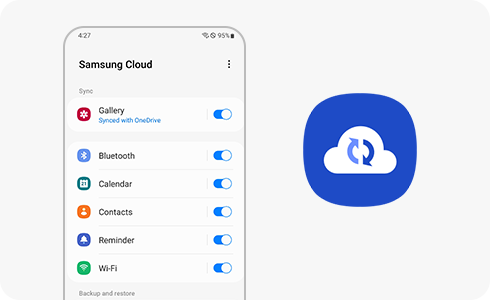
How to Use Samsung Cloud for Backup and Sync on Galaxy Devices?
Samsung Cloud helps you securely back up and restore essential data like photos, contacts, and app settings on your Galaxy device. Follow these steps to manage your cloud storage effectively.
1. How to Access Samsung Cloud on Your Device
Samsung Cloud is pre-installed on most Galaxy devices, including the Galaxy S24, Galaxy Z Fold, and Galaxy A series. Access it through your device settings:
- Open Settings on your device.
- Tap on your Samsung account profile.
- Select Samsung Cloud to view available options.
2. How to Sync Data with Samsung Cloud
Enable syncing for specific apps and data types to keep your information updated across devices:
- Navigate to Settings > Samsung account > Samsung Cloud.
- Tap Sync or Sync now.
- Toggle the switch for each app or data type you want to sync.
- Common sync options include contacts, calendar, notes, and messages.
3. How to Back Up Data Using Samsung Cloud
Backing up your data ensures you won't lose important files during device issues or upgrades:
- Go to Settings > Samsung account > Samsung Cloud.
- Tap Back up data.
- Select the data types you want to back up (e.g., photos, app data).
- Tap Back up to start the process.
- Ensure your device is connected to Wi-Fi to avoid data charges.
4. How to Restore Data from Samsung Cloud
Restore your backed-up data when setting up a new device or recovering lost files:
- Open Settings > Samsung account > Samsung Cloud.
- Tap Restore data.
- Choose the backup file and select the data types to restore.
- Tap Restore to begin.
- During initial setup, you can restore data by signing in to your Samsung account.
5. Supported Samsung Galaxy Devices
Samsung Cloud is compatible with most Galaxy devices, including:
- Galaxy S24, Galaxy S25, Galaxy S26
- Galaxy Z Fold and Galaxy Z Flip series
- Galaxy A series (A15, A25, etc.)
6. Additional Things to Check
Ensure smooth Samsung Cloud functionality by verifying these settings:
- Confirm your Samsung account is signed in and active.
- Check for sufficient storage space in your Samsung Cloud account.
- Update your device software to the latest version for compatibility.
Related Samsung Support Topics
Thank you for your feedback!
Please answer all questions.